Why is Numpy so fast?
Homogeneity
Numpy arrays have elements with homogeneous types, whilst native Python lists are just containers holding pointers to objects - even when they are of the same type.
The Principle of Locality is the tendency of a processor to access the same set of memory locations repetitively over a short period of time. Thus, since Numpy arrays are homogeneous, these elements can be cached, and future accesses to these will be relatively faster. This subdivision is called Spatial Locality.
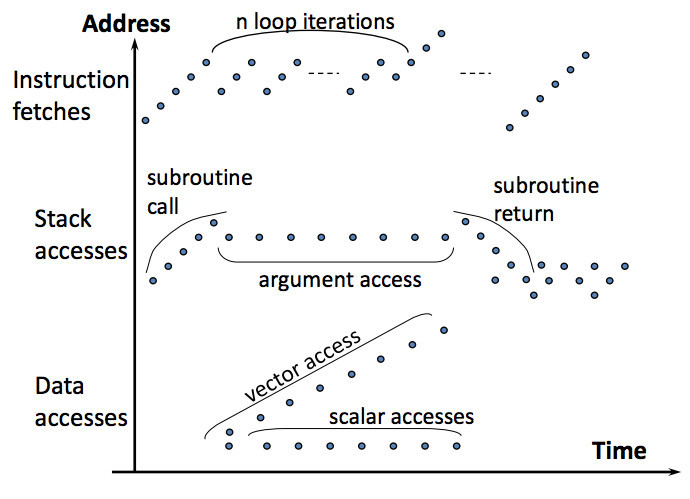
This figure explains Spacial Locality. You can see how during instruction fetches, $n$ loop iterations access same memory locations many times. Numpy arrays are contiguous. This means that the processor just loads the entire block into cache. So, accesses to all elements within the block are faster.
Due to this homogeneity, a lot of latency is saved on pointer indirection and per-element type checking. In Python lists, it won’t even matter if the list has the same type of elements. This is because it treats even primitive objects (like integers) as objects. When you add a variable, say $x = 20$ in a list, the reference to $20$ gets appended. Now, the list and $x$ both hold a reference to $20$. When you reassign any of them, the reference changes, meaning $x$ or the list will now hold a reference to the new object.
Vectorized operations
Arithmetic operations are applied to the entire array at once, instead of having to explicitly loop over the latter just to access an element, which introduces a complexity of $O(N)$ at worst. Numpy just offloads array processing to C, so array operations like iterations should always be done in such vectorized operations.
Array broadcasting is done when arrays are of different sizes, so it becomes possible to perform arithmetic operations between arrays are scalars. The scalar value is essentially expanded - so the number 2 will be treated as an array filled with twos. This is done so that looping occurs in C instead of Python. Needless copies of data are not created, so efficiency is almost always a by-product. Broadcasting (like many other vectorized operations), under the hood is almost always done in the form of “Universal functions” (ufunc for short). These are functions that operate on ndarrays in an element by element fashion. Most of the built-in functions, like addition are carried out this way.
Efficient internal organization
Numpy arrays aren’t actually arrays. They’re a data structure that consists of a contiguous data buffer and some metadata.
Internal data buffer
It is essentially a C-style array - a contiguous, fixed block of memory, containing similar elements. This is the portion that actually holds the array elements.
This is the fundamental aspect of an ndarray - It is essentially a chunk of memory starting at some location.
Buffer Metadata
It contains the following (quoted directly from the Numpy documentation):
- Size of the basic data element (ex.:
ints, which are 4 bytes, irrespective of 32-bit or 64-bit systems) - an offset relative to the start of data buffer
- the number of dimensions and the size of each dimension
- the stride
- byte order
- read flag (whether the buffer is read-only, or not)
- dtype: interpretation of the basic data element (yes, the users can create arbitrarily complex, composite data types as the basic array element!)
- Memory ordering:
Cis Row-Major, meaning that elements of a row are stored adjacent to each other, andFortranis Column-Major, so elements of a column are stored adjacent to each other.
If you want to read more about how Numpy works under the hood, check out Guide to Numpy by Travis Oliphant, who’s credited with the proliferation of Numpy, Scipy, and even Python itself.
Some Benchmarking
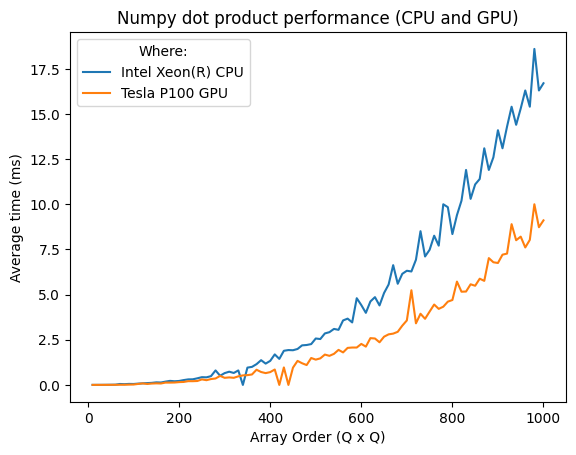
Let’s see how fast Numpy is. I’ll use the dot product of two $N\times N$ matrices as reference.
The elements of both the matrices will be randomly generated using numpy.random.rand(). Intuitively,
the random element generation was excluded from the time checks.
The benchmarks were done on an IPython Kernel, with an Intel Xeon(R). The timeit console utility
was used to time function calls. The Python documentation for timeit
states that there is a certain base overhead for executing a pass statement.
You can check that overhead for your machine by invoking timeit without any arguments.
a, b = numpy.random.rand(n, n), numpy.random.rand(n, n)
%timeit numpy.dot(a, b)
What next?
It is important to note that Numpy is not always fast. I’ll talk more about Numpy specific use cases, and where it fails against Vanilla Python. I also want to compare Numpy to BLAS and LAPACK, as Numpy does rely on both of them for some operations if they are installed. Benchmarking is a tough subject though, so the next article in this series will be solely focused on it. There, I’ll also compare it to other Linear Algebra APIs, maybe in C/C++ (something like Eigen). Till then, read more about BLAS and LAPACK with Numpy here.